

Remote Onboarding Checklist: A Step-by-Step Guide for HR Teams


Below you’ll find the essential elements every remote onboarding checklist should include. Whether you’re onboarding remote employees for the first time or refining an existing structured onboarding plan, this guide walks you through everything from pre-boarding activities to the first performance review. Let’s build a remote onboarding checklist that actually works.
Before the Onboarding Process Begins
1. Share Key Information Before Day One
When someone new joins your remote team, it’s important to give them the resources they need to succeed before their official start date. This is where pre-boarding activities come in, and they can make or break a new hire’s first impression of your company culture.
A solid onboarding process should include materials that help new hires get familiar with your organization before they even log in for the first time.
Preboarding materials typically include:
- An employee handbook covering the essentials of your company policies
- Official policies on sick leave, paid time off, insurance, and other benefits
- Training modules relevant to the new hire’s department and role
- A list of frequently asked questions from new employees
Most of this can be sent by email, but don’t be shy about walking a new hire through it live on a video call. It gives them a chance to ask questions and start building a relationship with their manager before day one.
💡 Tip: Don’t underestimate preboarding
The first impression isn’t made on day one. It’s made the moment a candidate accepts your offer.
Automate your pre-start communication, share documents securely online, and get new hires ready to go before their first day even begins.
2. Take Care of Employee Forms and Global Employment Requirements
Before a new hire’s first day, HR professionals need to handle the administrative side of the employee-employer relationship. This part of the onboarding checklist is easy to overlook, but it protects both the company and the new hire.
Depending on where your new hire is based, this can include:
- Employee forms for tax or payroll setup
- State registration and compliance with local labor laws
- A signed remote work agreement outlining expectations, hours, and equipment policies
- Identity security checks, ideally handled through a virtual signing system or e-sign tools rather than paper documents
If you’re hiring across borders, global employment adds another layer of complexity, since labor laws, tax requirements, and registration rules vary by country and even by state. A good HRIS system can help you keep track of deadlines and documentation so nothing slips through the cracks.
Setting Up Tools, Access, and Security for Remote Onboarding
3. Get the IT Department Involved Early
One of the most common reasons onboarding remote workers goes wrong is a slow or disorganized tool setup. Your new hire shouldn’t spend their first day waiting on IT accounts, login credentials, or hardware.
Work with your IT department to prepare, ahead of time:
- IT accounts and access control profiles tailored to the new hire’s role
- Multi-factor authentication set up on all relevant IT systems
- Security training covering your company’s security protocols and security best practices
- Access to cloud storage systems, communication tools, and any other core digital workflows the role requires
Since remote employees often connect from personal networks and home workstations, digital security protocols matter even more than they would in an office. Building this into your remote onboarding plan from day one helps prevent costly security gaps later.
During the Onboarding Process
4. Host a Welcoming Kickoff Meeting
One of the first things you should do once a remote employee onboarding process officially begins is schedule an online welcome meeting.
This meeting gives you a chance to learn more about the person and what they expect from you as an employer. It also gives your new hire a clearer sense of what they’re stepping into.
Here are a few video conferencing tools that work well for this:
During this HR meeting, make sure to cover anything important on your end and leave plenty of room for your new hire to ask questions.
5. Give New Hires a Direct Support Contact
Starting a fully remote job can be intimidating, especially if it’s someone’s first time working outside a traditional office.
To help new hires feel more confident in their first few weeks, consider setting up an onboarding buddy program. Mentorship programs like this pair new hires with someone they can turn to whenever a question comes up, whether that’s a team lead or simply a more experienced colleague.
Employees appreciate having that kind of support close by. With a quick message in your team’s Slack channels or other real-time messaging tools, help is never more than a few minutes away.
💡 Tip: Want full control over your remote onboarding?
Build a clear onboarding plan, assign tasks, automate documents, and keep the entire onboarding process in one place.
6. Organize a Virtual Team-Building Event
Virtual team-building events are a great way to help remote workers feel like they’re truly part of the company. They also make it much easier for new hires to get to know their new colleagues.
Hosting a virtual gathering benefits both employees and employers. Team members can join from anywhere in the world, which makes participation easy, and as an employer, you save on travel costs and time.
A few ideas for virtual hangouts and virtual town halls include:
- Digital card games
- Virtual coffee breaks and happy hours
- Donut Meetups on Slack
- Online trivia
- Home-party style games
- Recipe swaps
- Kahoot!
- Water Cooler Trivia
These activities have little to do with the technical side of a new role, but they’re still valuable training in a different sense. New hires get to see their colleagues as people first, and coworkers second. A few virtual high-fives go a long way toward building genuine employee engagement early on.
7. Provide All the Equipment and Tools Your New Hire Needs
Another key piece of any employee onboarding checklist is making sure new hires have everything they need to actually do their job.
Some companies provide remote workers with hardware such as laptops or desktops, phones, and printers. It’s also common to send a bit of company swag, like a branded mug or t-shirt, to help new hires feel welcomed and connected to the employer brand from day one.
Companies also equip remote workers with the software they need, such as:
- A company email account
- CRM software
- Communication tools like Slack
- Project management software like Asana
- Office 365
- HRIS systems for HR and payroll
- Cloud storage systems
For more ideas on what your remote team might need, here’s a broader toolkit worth considering:
- Mobile hotspots
- Whiteboards and mind-mapping tools
- Remote desktop software
- Project management software
- Note-taking apps
- Security tools
- Automation tools
- Team chat apps
- Video conferencing tools
- Task list apps
- Screen-sharing software
- Screen recording tools
- Cloud storage
- Knowledge management tools for documenting processes and company policies
Some companies also offer remote work allowances to help employees set up a proper home workstation, covering things like a monitor, desk, or ergonomic chair. It’s a small investment that pays off in comfort and productivity.
Training, Growth, and Feedback in the Onboarding Process
8. Offer Training and Growth Opportunities from Day One
If this isn’t already on your list, it needs to be.
Companies like Siemens USA invest hundreds of millions of dollars every year in employee training. On top of that, the vast majority of remote workers regularly complete training sessions related to their role, with most of that training coming directly from their employer.
Your remote employees will appreciate knowing you’re invested in their growth. Research consistently shows that most remote workers welcome regular training from their company, whether that’s through interactive online training, live training sessions, or self-paced training modules.
Make sure this step happens early. Once employees see you investing in their skills, they’re more likely to feel ready to hit the ground running, which in turn supports employee retention. It’s a win for everyone involved. Tracking your training completion rate is also a useful way to measure employee progress and spot where extra support might be needed.
9. Encourage Feedback
Your remote onboarding plan is only as good as your new hires say it is.
As part of welcoming new employees to your company, make it a habit to collect their feedback on the entire experience.
This kind of feedback helps you identify what’s working in your onboarding process and what needs improvement. It can also significantly strengthen your relationship with new hires. A few tips for collecting feedback remotely:
- Create a safe, comfortable space for people to share honest feedback
- Schedule dedicated time for feedback conversations
- Give context around the feedback so it’s clear and actionable
- Use feedback tools like YouEngage or Google Forms
Since a large share of companies struggle to get onboarding right, this kind of feedback loop, paired with a regular performance review cadence, can be genuinely useful in making sure your remote onboarding process is on track. Left unaddressed, onboarding gaps are one of the biggest drivers of employee turnover in the first year.
Remote Onboarding Checklist Recap: Have You Covered Everything?
- Share key information before day one
- Take care of employee forms and global employment requirements
- Get the IT department involved early
- Host a welcoming kickoff meeting
- Give new hires a direct support contact
- Organize a virtual team-building event
- Provide all the equipment and tools your new hire needs
- Offer training and growth opportunities from day one
- Encourage feedback
The Future of Remote Employee Onboarding and Remote Work
Hybrid and remote work environments are only going to keep evolving. There’s no question about that.
In its “2021 State of Remote Work” report, Buffer found that 59% of respondents wanted to keep working primarily remotely even after the COVID-19 pandemic came to an end.
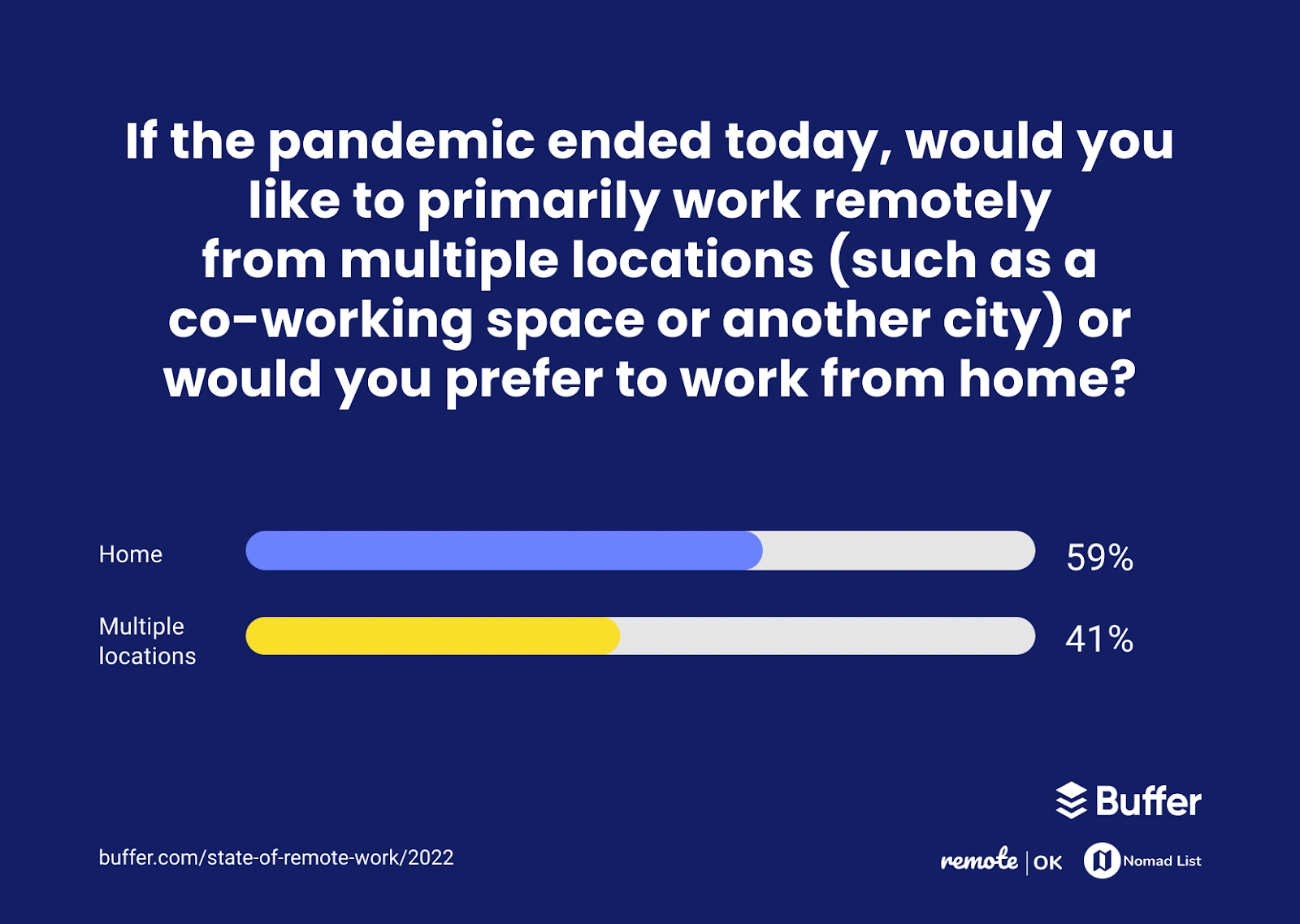
Given how strongly employees feel about remote working, employers will need to keep adapting their operations to fit the needs of a distributed remote team. Compared to in office onboarding, remote onboarding still requires more intentional planning, but it also opens the door to hiring great people regardless of location.
One of the best ways to adapt is to build a genuinely effective process for onboarding remote employees. We hope the tips above help you do exactly that.
Build a Smoother Remote Onboarding Experience with Sloneek
Along with everything covered above, there’s one more thing worth considering: Sloneek.
Sloneek is a Human Resources platform built to make onboarding easier for growing remote teams. It supports the entire employee lifecycle, from the recruitment process and interview process through onboarding, HRIS record-keeping, and beyond.
Our easy-to-use, self-onboarding software helps you:
- Turn a well-designed onboarding process into a great experience for everyone involved
- Keep all employee records in one online onboarding portal, supporting your broader organizational structure
- Automate tedious HR tasks like registration procedures, training programs, onboarding templates, checklists, and competency assessments
- Get full visibility into every stage of the onboarding process
- Onboard new hires quickly and confidently, whether they’re joining in person or fully remote
- Reduce the overall cost of onboarding
And that’s just the start.

Sloneek’s onboarding tool makes it easy to build and manage an effective remote onboarding program, complete with an employee intranet, digital onboarding experience, and up-to-date HR checklist templates for every step of the process. It’s designed to keep HR professionals informed with the latest updates on each new hire’s progress, strengthening your employer brand along the way.